
About RunRev
RunRev is a minimalistic way to keep track of your daily, monthly, and yearly runs. It's designed for the casual runner who wants at-a-glance data without the complexity of full-featured running apps.
I built it because I wanted something simple - no social feed, no subscription, no sign-in. Just my numbers when I want them.
Features
- Daily, monthly, and yearly tracking - See your progress at a glance
- Beautiful widgets - Home screen and Lock Screen widgets
- Monthly goals - Set a target and track your progress
- Easy sharing - Share your stats with friends
- No sign-in required - Uses HealthKit data you already have
New in 4.2: iPhone Duo and Haunt Mode
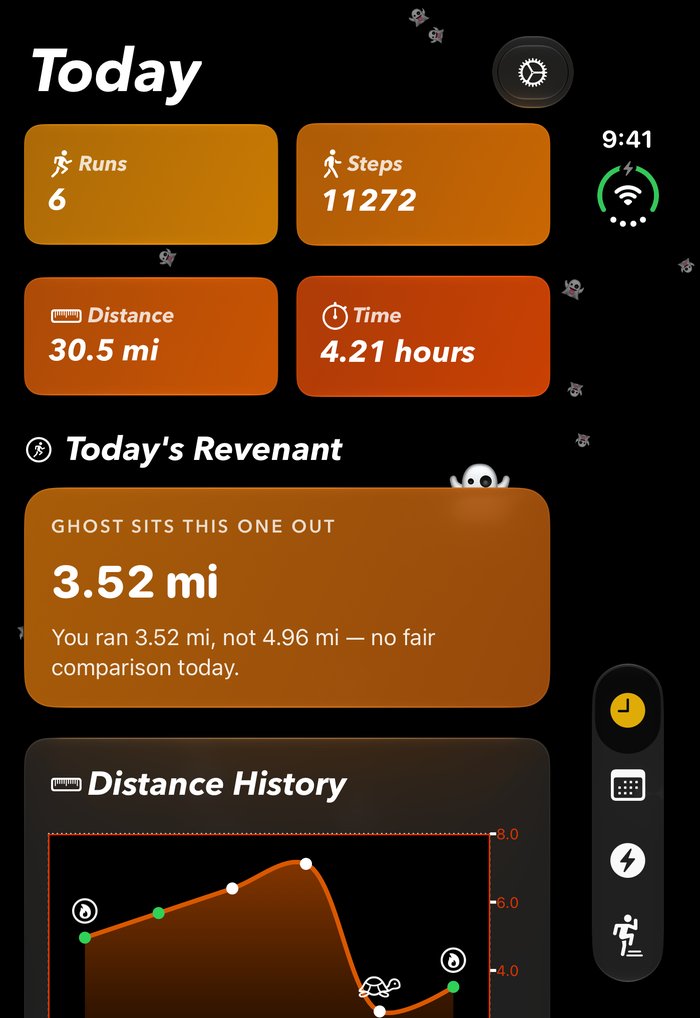
- iPhone Duo - Layouts now size themselves from the width they're given rather than the device they're on. The outer screen gets a two-column grid, the inner display puts the chart beside the ghost card, and everything reflows live while you resize a window.
- Haunt Mode 👻 - For the 31 days of October, RunRev goes orange and haunted. Ghosts drift across the screen, every so often one peeks out from behind a card, and the ghost runner gets a new name: it's "Today's Revenant" now. The widgets go orange too. Not your thing? Turn it off in Settings, or swap it for snow.
The name was always short for revolution - one lap around the sun. "Revenant", a spirit that keeps coming back, turned out to be a better second reading for an app whose headline feature is racing a ghost of yourself.
New in 4.0
4.0 is the biggest update since launch, and it's the first one where RunRev does more than report numbers back to you.
- Run without your watch - Record a run with just your iPhone. Full GPS route, pace and splits, saved straight to Apple Health, with a Live Activity on the Lock Screen and in the Dynamic Island while you run.
- Route posters - Every route becomes something worth sharing. Post and Story formats, four palettes, and a stroke that brightens as you speed up.
- Race your past self - Line up against your fastest run at that distance and watch the gap open or close as you go.
- Cinematic replay - Scrub through any run and watch it fly along your route in 3D, with pace, heart rate and elevation following the playhead.
- Training plans - Pick a goal race and get a week-by-week plan, built on your device.
- An Apple Watch app - Start, pause and finish runs from your wrist, with live metrics relayed to your phone.
- Everything else you do - The Activities tab now covers walking, cycling, hiking, strength and swimming, with a year heat map and a time-by-activity breakdown.
- Ask Siri - "What do I have to beat for five miles?" answered from your own history.
About those training plans
The original version of this page said RunRev had "no training plans," and said it as a feature. I'd been annoyed by apps that wanted me to commit to a program before they'd show me how far I'd run this month.
I still think that's the right instinct, and I changed my mind anyway.
What I actually objected to wasn't structure - it was being managed. A plan that nags you, that treats a missed Tuesday as a moral failing, that needs an account and a subscription to tell you to run easy on Wednesday. Those are the things that made me close those apps.
So RunRev's plans work the other way around. You pick a race and a date, it lays out the weeks, and then it gets out of the way. It's generated on your device, it isn't a subscription, and if you ignore it for three weeks nothing happens - it's still sitting there when you come back. Today's workout shows up on the home screen as one line. That's the whole interaction.
The rest of 4.0 followed the same rule. The route poster and the ghost runner are both things you opt into on a run you already finished. Nothing pings you.
The Tech
Built entirely with SwiftUI - no UIKit code at all. This was one of my goals from the start: prove that SwiftUI could handle a full production app.
Key technical highlights:
- HealthKit for run data, and for writing phone-recorded runs back out
- WidgetKit for home screen and lock screen widgets
- ActivityKit for the Live Activity and Dynamic Island
- WatchConnectivity to relay live metrics from the watch app
- MapKit for the 3D route replay
- App Intents for the Siri rival lookups
- Charts for data visualization
- Custom animations throughout the UI
One thing I'd underestimated: the App Store screenshots. RunRev renders everything from HealthKit, so a fresh simulator has nothing to show. I ended up building a launch-argument screenshot mode that seeds a mock health store and opens the app directly onto any of six screens, so the whole set regenerates with one command. That's a post of its own.
Why I Built It
As a runner, I was frustrated with apps that wanted me to join communities, create accounts, or pay a subscription for basic stats. I just wanted to see how far I've run this month.
RunRev still does that. Open it, see your numbers, close it. Everything added since is optional and stays out of the way until you go looking for it.
Screenshots


Contact & Privacy
If you have any feature requests or issues, please contact me at @ryleyherrington on Twitter or email me at ryleyherrington@yahoo.com.
Privacy Policy: RunRev has no advertising, no account and no sign-in. Your runs live in Apple Health on your device; there is no RunRev server and I never see them. Routes, paces, heart rate, posters and training plans are all computed on the device and never leave it.
The app does include one third-party library: TelemetryDeck, a privacy-focused analytics service. It records general usage events - which screens get opened, which settings get toggled, whether Run Wrapped got viewed - so I can tell which features people actually use and which ones to stop maintaining.
None of it is tied to you. There's no account, so there's no name, email or profile to attach anything to, and no run, route, pace or heart rate ever leaves your device. What TelemetryDeck does receive is a one-way hash of a device identifier, so that ten launches from one phone count as one person rather than ten. I can't reverse it, and it isn't linked to anything else. No advertising identifiers, no cross-app tracking, no data brokers.
There is no internal sharing. You're welcome to share the app yourself if you enjoy it.