About Car Thing Deck
I bought a Spotify Car Thing for about $15 when Spotify announced it was killing the product. Then Spotify actually killed it, and it became a very nice-looking brick that sat next to my keyboard for years.
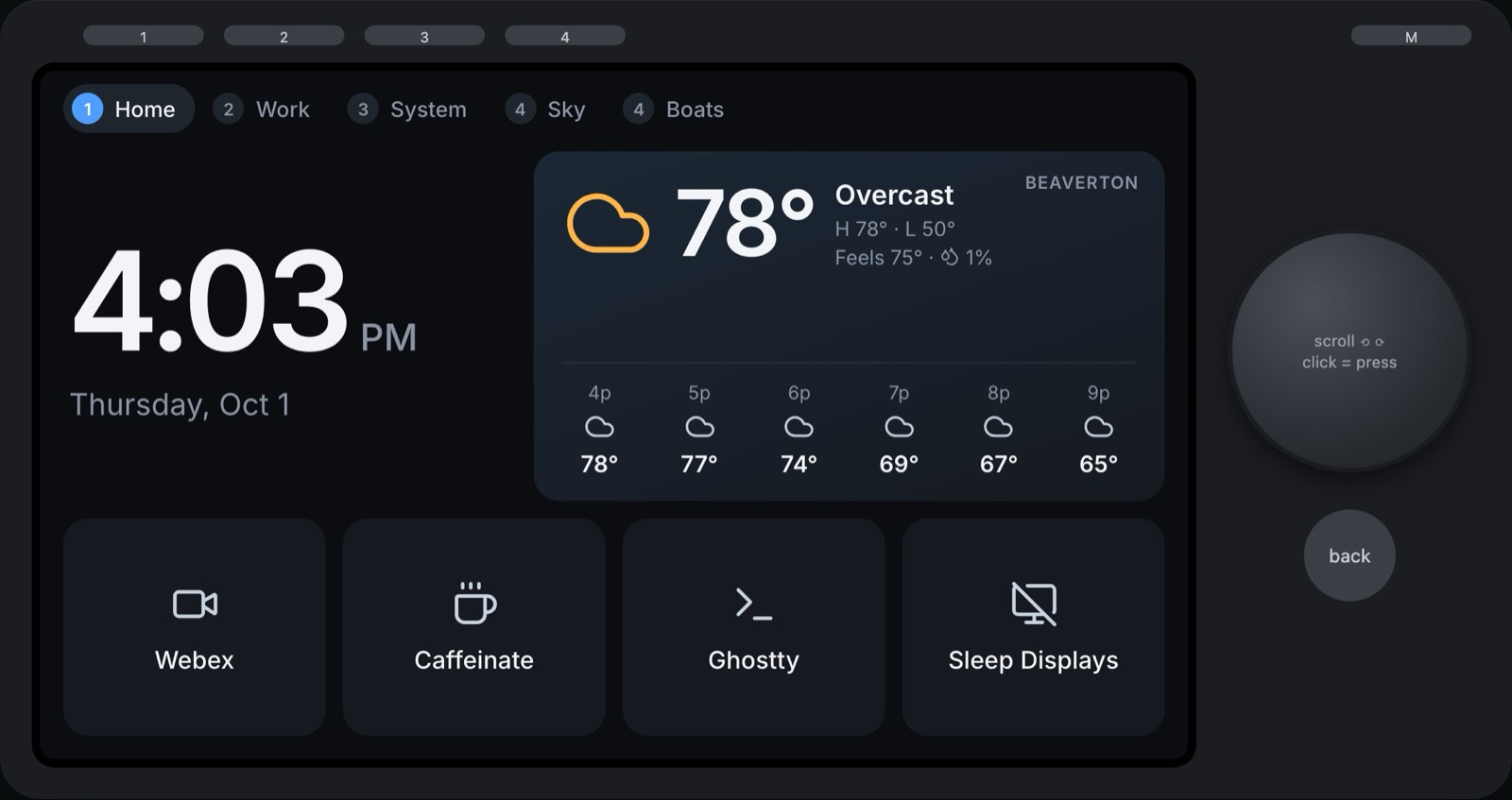
Now it finally does something. With a lot of help from Claude, it's a little touchscreen companion for my desk: a clock, the weather in Beaverton, a grid of buttons that do things on my Mac, and the part I can't stop looking at: a live map of every plane over Portland and every ship crossing the Columbia River bar. I'm chuffed.
The Hardware Is Actually Great
For something that was sold as a car accessory, the Car Thing is a surprisingly good desk gadget:
- An 800×480 touchscreen that's bright and sharp
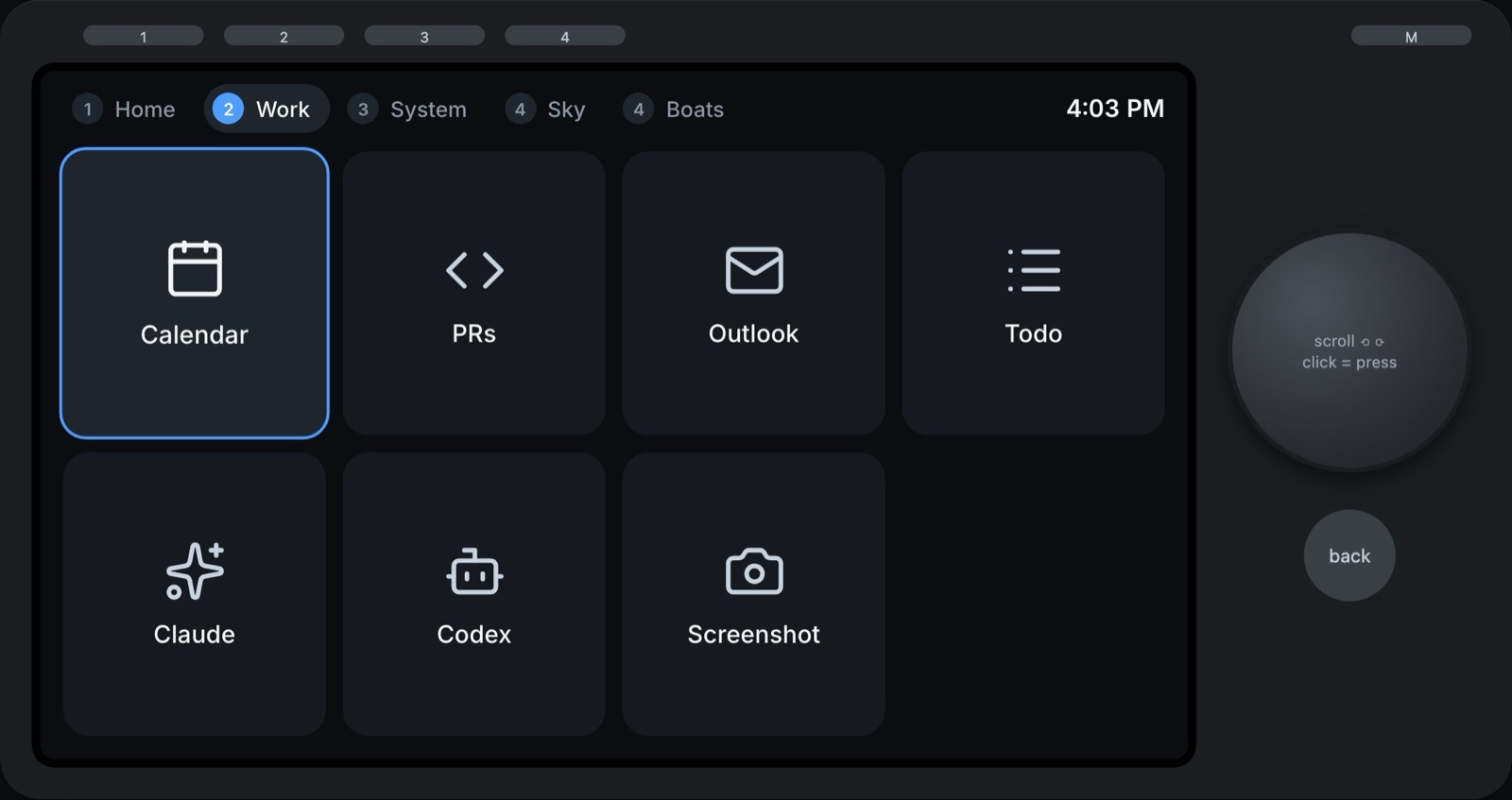
- Four preset buttons along the top, plus a settings button
- A big, clicky dial you can turn and press
- A back button below the dial
- Four microphones and an ambient light sensor, for later
The community has already done the hard part, which is getting custom firmware onto it. Nocturne keeps the Spotify experience alive, and bridgething turns the Car Thing into a general-purpose little computer that runs web apps. I'm running bridgething.
Sky: What's Flying Over My House
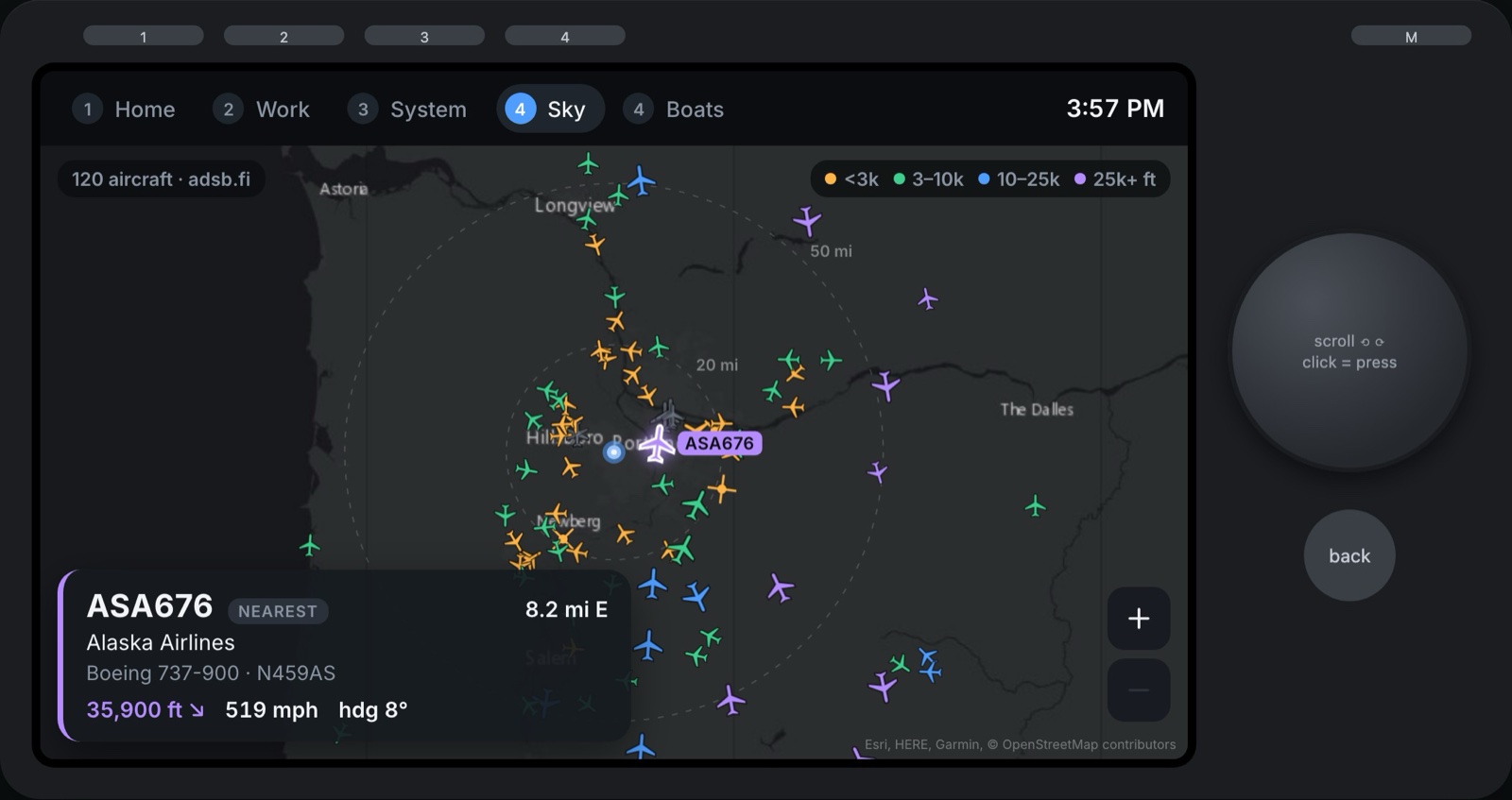
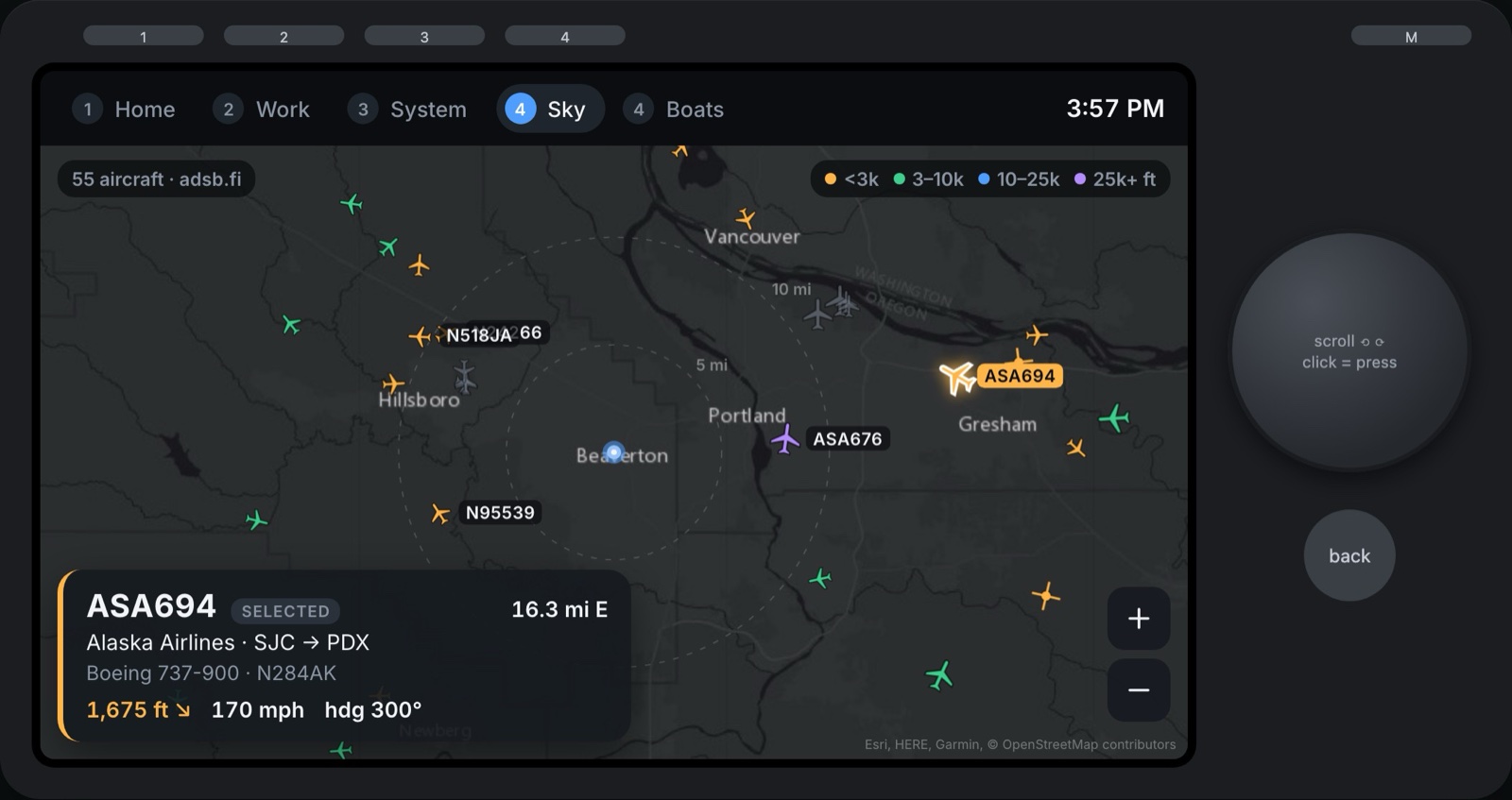
Press 4 and the Car Thing turns into a radar screen. It's a dark map of Portland centered on my house, with every aircraft within 25 miles or so drawn where it is right now, pointing the way it's flying and colored by altitude: orange under 3,000 feet, green up to 10,000, blue up to 25,000 and purple above that.
The first time I opened it there were 65 aircraft in the air around me. Most of them, it turns out, are Cessnas from the flight schools at Hillsboro, looping around a few miles west of my desk. Every so often something stranger shows up. While I was taking screenshots for this post, the nearest plane was an FAA King Air at 1,950 feet: a flight-check aircraft, which flies low and slow to make sure the navigation equipment around the airports is working properly.
A card in the corner always shows the nearest plane in the air: its callsign, airline, route, aircraft type, altitude (with an arrow if it's climbing or descending), speed and how far away it is. Press the dial to step to the next-nearest, or just tap a plane. Turn the dial to zoom out, and the whole region shows up at once: 120 aircraft from Longview to Salem, with a string of arrivals lined up for PDX.
Where the Planes Come From
Planes broadcast their position, altitude and speed a couple of times a second, over a system called ADS-B. Anyone with a cheap antenna can listen in, and thousands of hobbyists feed what they hear into community networks. I'd seen that Finland had an open API for this, and it sort of does: adsb.fi is a volunteer-run Finnish network with free worldwide data and no API key.
- The Mac asks adsb.fi for everything in view every five seconds, with adsb.lol as a backup. It only does this while Sky is on screen, and stops 30 seconds after I leave.
- The map is Esri's dark gray canvas. The Car Thing has no internet of its own, so the Mac downloads the map tiles, stitches them into one image per zoom level, darkens it so the planes pop, and sends it over Bluetooth. Each one is about 25 KB, and they're cached, so it only happens once.
- The motion is smoother than the data. Positions only arrive every five seconds, but every second the Car Thing works out where each plane should be from its speed and heading, and glides it there. Planes drift across the map instead of jumping.
The Route Problem
ADS-B tells you where a plane is, not where it's going. For that, the Mac looks up the flight number in adsbdb, a free database of routes. The first version cheerfully told me an American Airlines flight over Portland was going from Charlotte to Philadelphia. Flight numbers get reused, and the database was out of date.
So now a route only shows up if it makes sense: the plane has to be roughly on the way between the two airports. That fixed Charlotte to Philadelphia, but taking screenshots for this post caught a sneakier one: an Alaska flight labeled Seattle to Las Vegas, flying due north. Airlines often use the same number for the trip back. Now the plane also has to be pointed toward where it's supposedly going.
There was a similar problem with who's flying. The registered owner of most airliners is a bank holding them in trust, so for a while the card said a 737 out of PDX was being flown by "Wilmington Trust Co Trustee". For airline flights it now shows the airline instead.
Boats: A Detour Through Finland
The Finnish idea paid off for boats too. Ships broadcast their own version of ADS-B, called AIS, and Finland's traffic agency Fintraffic publishes every ship its coastal stations can hear through an open API called Digitraffic. No key, no sign-up, free to use.
The catch is that it only covers the Baltic. So the first version of the Boats page was a live map of the Gulf of Finland, which turns out to be a lot of fun at 11pm Helsinki time. Car ferries shuttle back and forth between Helsinki and Tallinn, tankers head east toward Russia, and while I was grabbing screenshots the cruise ship Norwegian Sun was steaming into Helsinki.
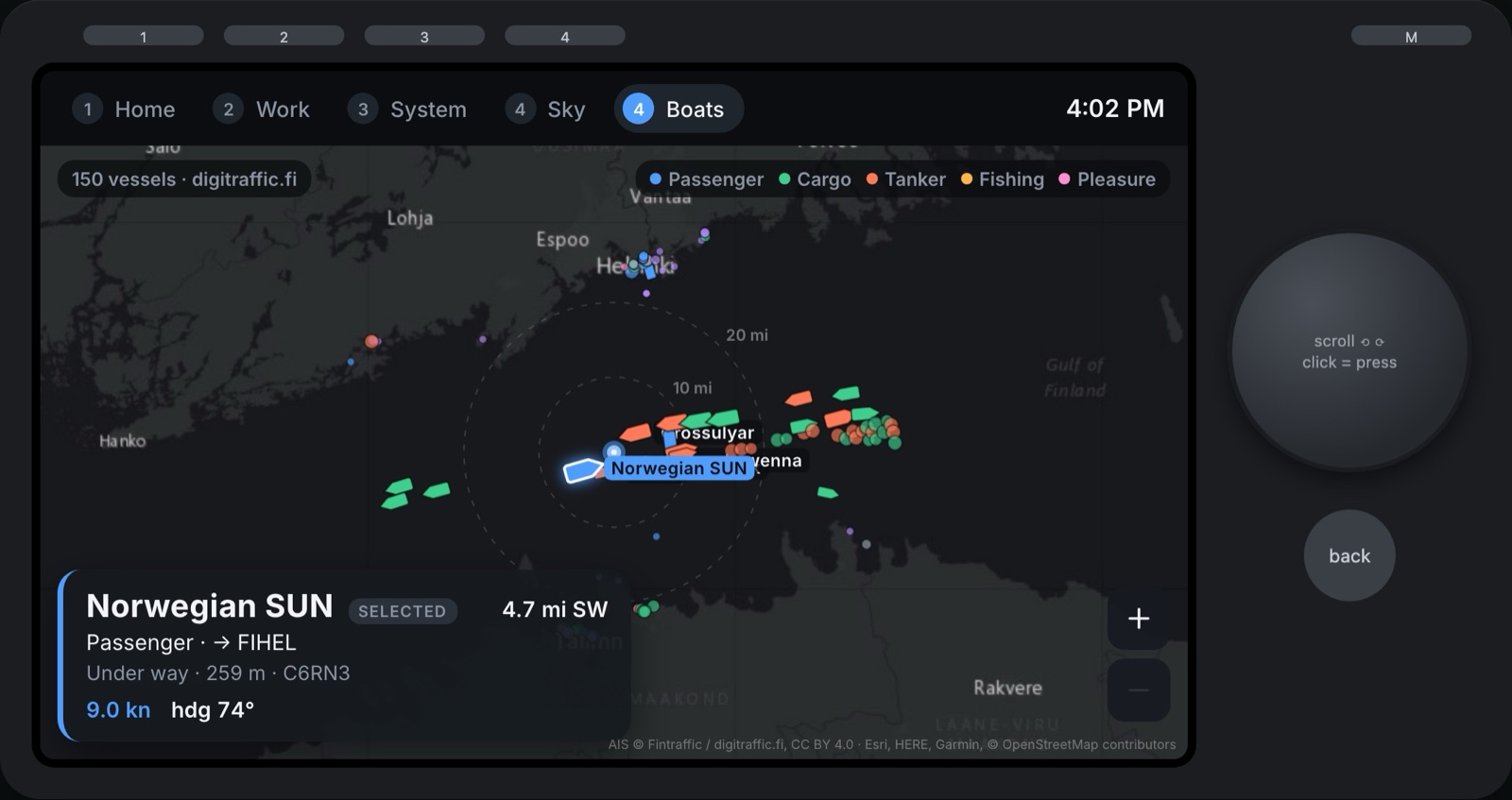
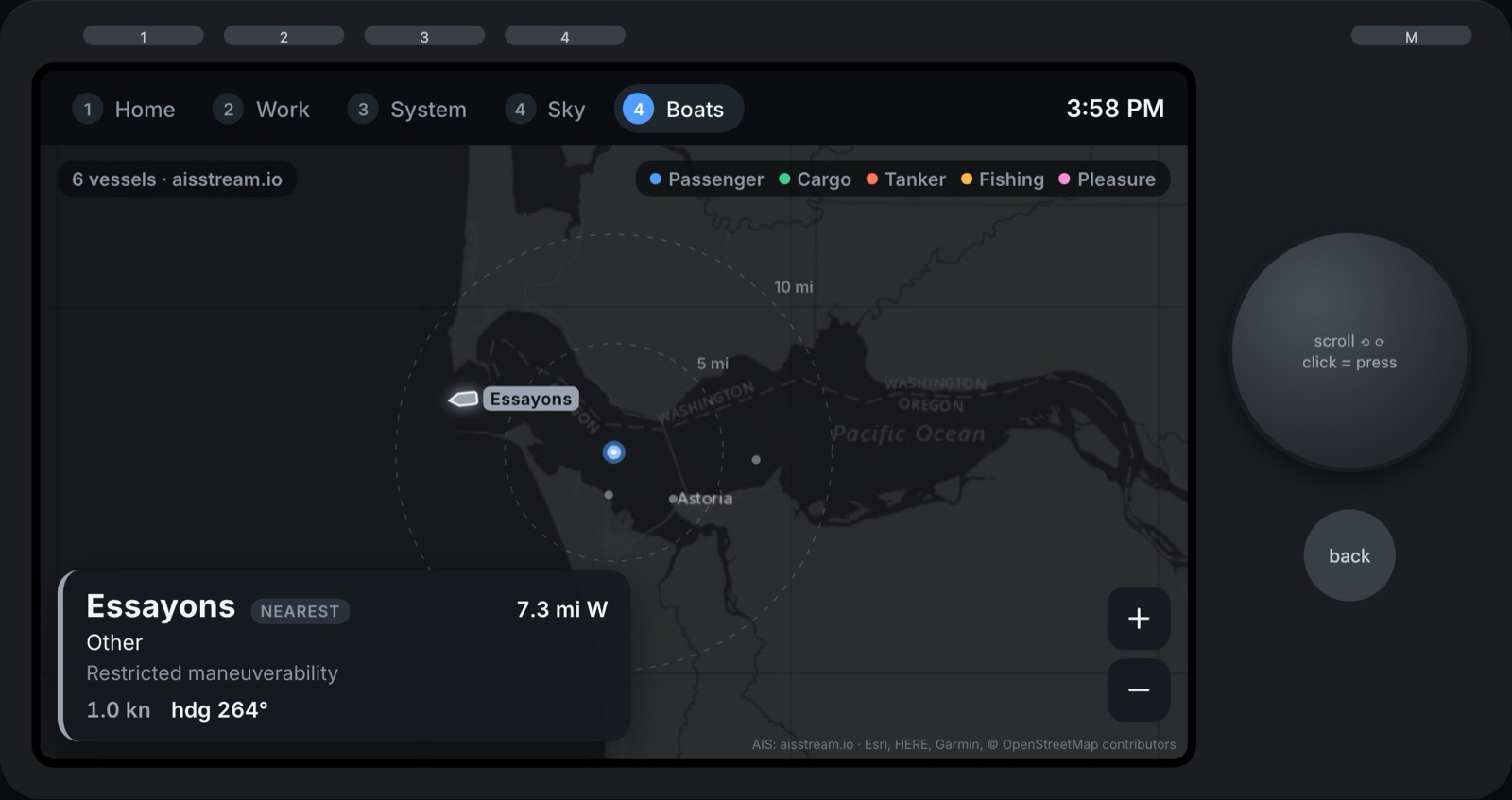
Ships are colored by type (passenger, cargo, tanker, fishing and pleasure boats), moored ones shrink to little dots, and the card shows each ship's name, where it's headed, its length and its speed.
Boats: Back to the Oregon Coast
Fun as Finland is, I wanted my coast. There's no free government feed for US waters, but aisstream.io has a free live feed for the whole world once you sign up for a key. The Mac now picks the source on its own: Digitraffic for anywhere in the Baltic, aisstream for everywhere else.
I pointed it at the Columbia River bar, where the river meets the Pacific at Astoria. It's one of the most dangerous river entrances in the world (they call it the Graveyard of the Pacific), and every big ship takes on a local pilot to cross it. On a normal afternoon there are cargo ships waiting offshore and crossing in, fishing boats working out of Astoria and Ilwaco, and the Essayons, an Army Corps of Engineers dredge that spends its days keeping the channel deep.
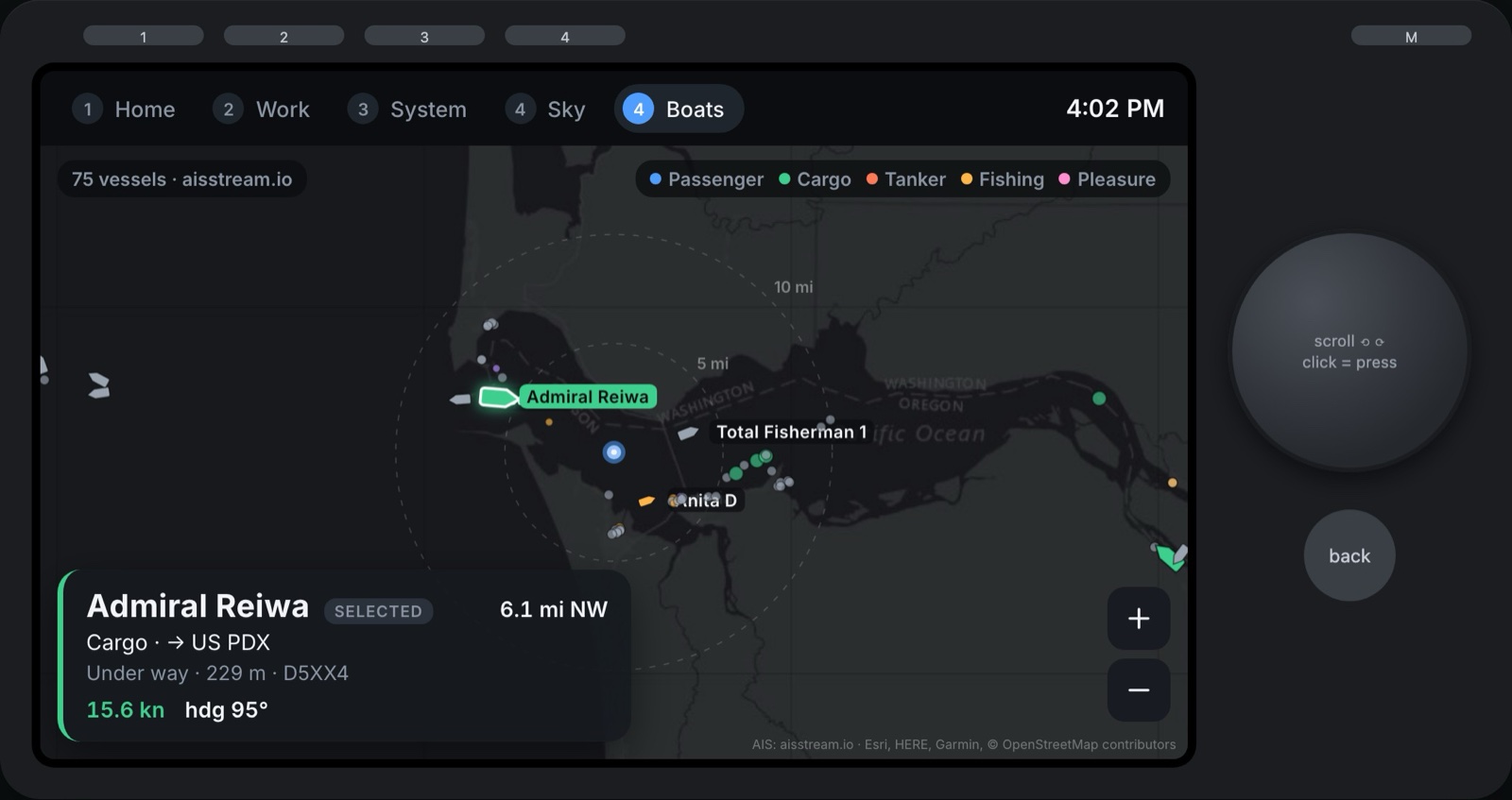
That's the Admiral Reiwa, a 229-meter cargo ship bound for Portland, crossing the bar at about 16 knots.
AIS Is Charmingly Messy
- It fills in slowly. Ships send their position every few seconds, but their name and type only every six minutes or so. A fresh map starts as a handful of gray, nameless shapes and gets names and colors over the next few minutes. The Mac remembers every ship for an hour, so it only looks empty the first time.
- Destinations are codes. Ships type their destination into a radio, and most use port codes: "US PDX" for Portland, "FIHEL" for Helsinki, "EEVAN-FIHEL" for Tallinn's old harbor to Helsinki. The first version tried to tidy them up into "Eevan-Fihel", so now they're shown exactly as sent.
- "Unknown" is a number. A ship that doesn't know its speed reports 102.3 knots, and one without a heading reports 511 degrees. Those get filtered out before they reach the screen.
- The map has opinions. Esri's map counts the Columbia's estuary as part of the Pacific, so "Pacific Ocean" is printed in the river east of Astoria. Not my bug, so it stays.
How It Works
- The screen is a small React app installed on the Car Thing as its home screen.
- The Mac side is a tiny menu bar app I wrote in Swift. It speaks bridgething's gateway protocol over Bluetooth - framed MessagePack messages over an RFCOMM channel - so I don't need to run anyone else's software on my Mac.
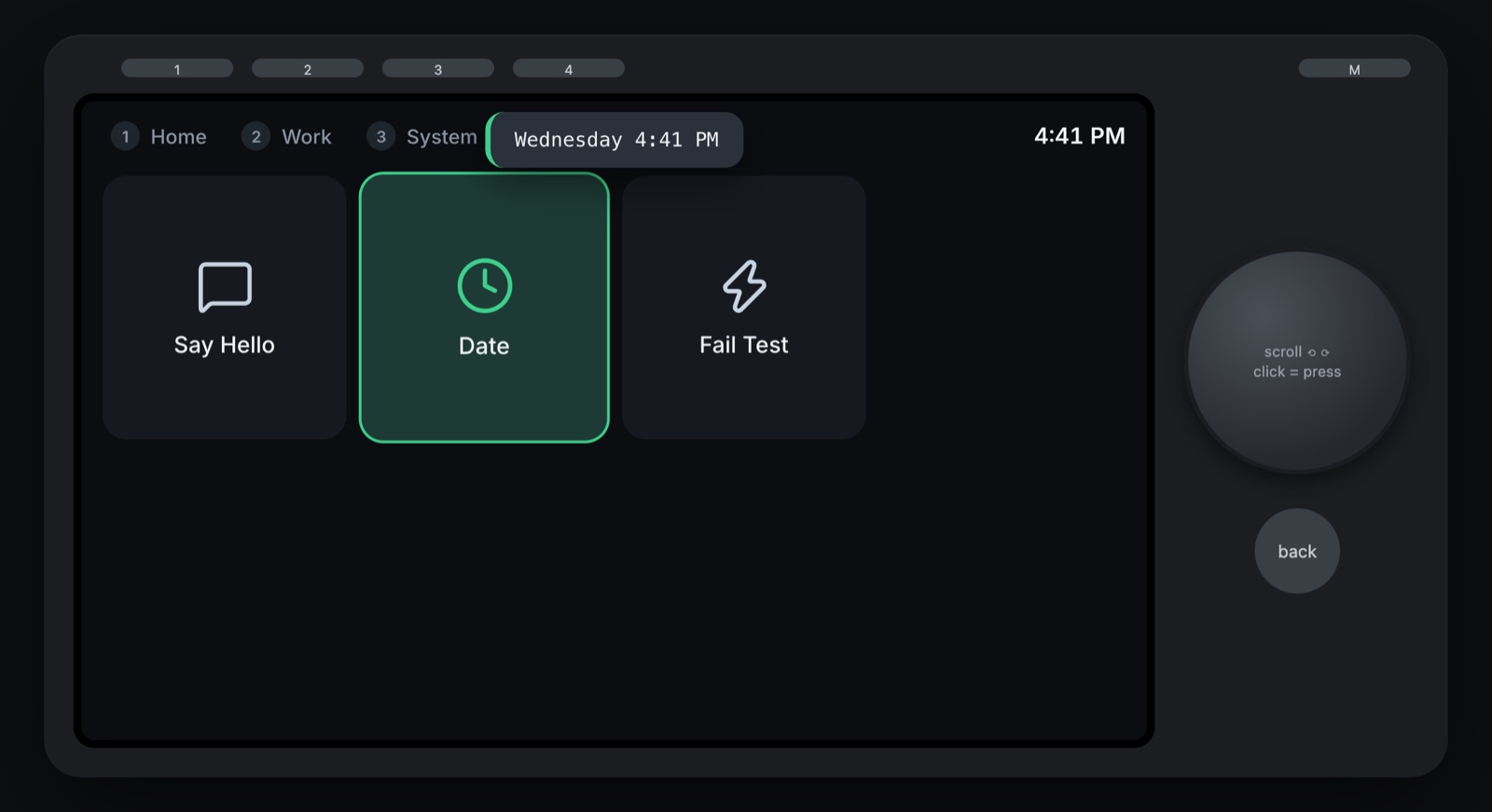
- Pressing a button sends a message to the Mac, which runs the action: a shell command, a Shortcut, opening an app or URL, or a keyboard shortcut. The result comes back as a little toast on the Car Thing, round trip in about 50 milliseconds.
- The Mac does all the fetching, because the Car Thing has no internet of its own: the weather from Open-Meteo, the planes, the ships and the map images. It doesn't have a real clock either, so the time comes from the Mac as well.
- Updates install over Bluetooth too. The Mac app zips up the web app and streams it to the Car Thing in a few seconds.
- Every page and button lives in one JSON file, including where each map is centered. Save it and the Car Thing updates instantly.
There's also an emulator: the real UI in a fake Car Thing frame in the browser, with clickable buttons and a scrollable dial. That's where the screenshots on this page came from.
The VPN Plot Twist
The original plan was to talk to the Car Thing over its USB cable, which shows up on the Mac as a tiny network. That worked great right up until my work VPN connected, at which point the Car Thing vanished. The VPN routes that little USB network into the tunnel, and I'm not about to fight corporate IT over a desk toy.
So everything moved to Bluetooth. It works whether the VPN is on or off, and the USB cable is just power now.
The Controls
- Buttons 1–4 jump between pages: Home, Work, System and Sky. Sky and Boats share button 4, so pressing it again flips between them
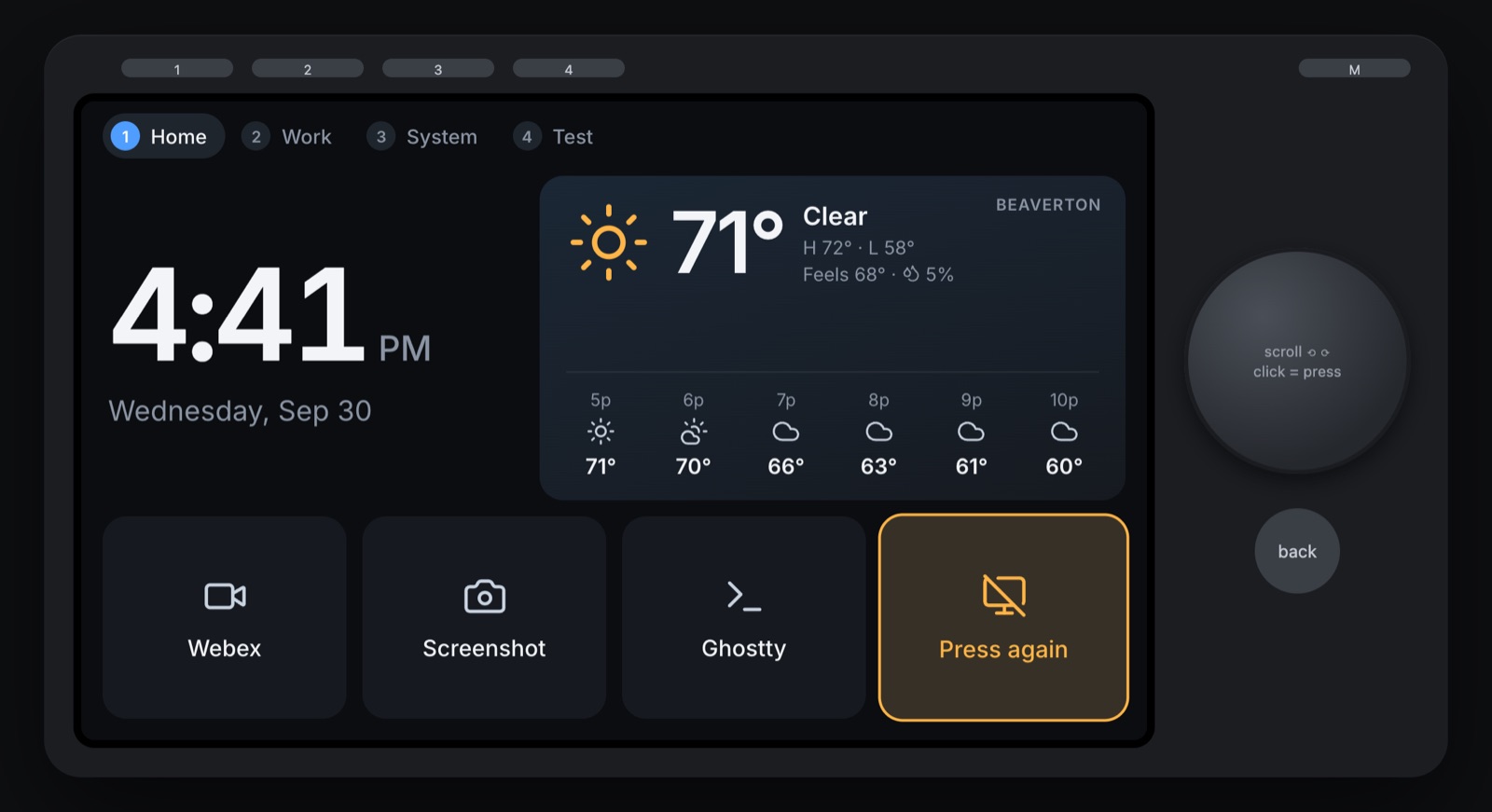
- The dial is my Mac's volume on the home page (press it to mute), moves between tiles on the others, and zooms the maps
- Pressing the dial runs the selected tile, or steps to the next-nearest plane or ship
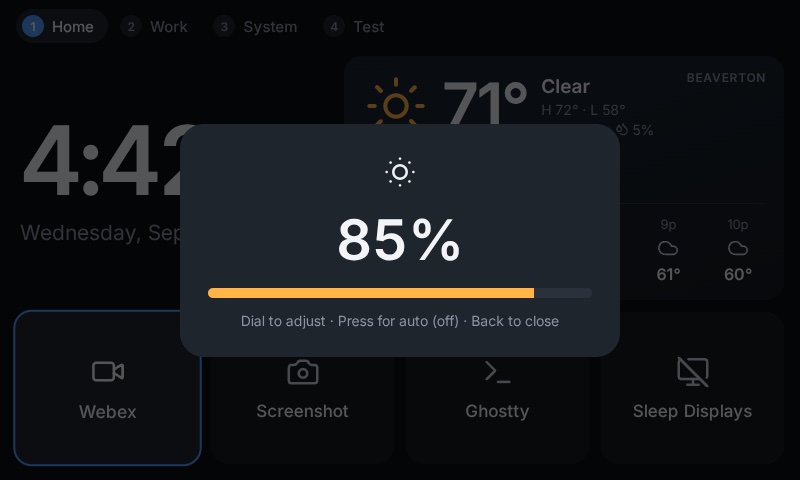
- Back cancels, and M goes home (hold it to adjust brightness)
- Touch works too, including tapping a plane or ship to see what it is
Anything I'd regret running by accident, like sleeping my displays in the middle of a meeting, asks for a second press first.
Building It with Claude
I want to be upfront: Claude did a lot of the heavy lifting here. It read two firmware codebases, worked out bridgething's Bluetooth protocol from its source, wrote the Swift companion app, and tested everything against the real device by driving its screen through Chrome DevTools.
The maps started with me saying "I saw Finland has an open API, see if you can figure it out." Before writing any code, Claude tried half a dozen free data sources from my Mac: one map provider had started requiring a key, one flight API wanted an email first, and my "Finnish government API" turned out to be two different things, adsb.fi for planes and Digitraffic for ships.
It also caught bugs I'd never have thought to look for. Spinning the dial quickly was dropping ticks. After the Car Thing rebooted, the Mac app waited forever to reconnect. Both got found by actually poking at the hardware and fixed the same afternoon.
My job was mostly deciding what I wanted on my desk. Which, honestly, is the fun part.
What's Next
I can already tell this home screen is going to change a lot. Next up: a button that screenshots the iOS Simulator, water reminders, a meetings page with join and mute, and a page that shows what my Claude Code sessions are up to.
Screenshots
Tech Stack
- bridgething - Custom firmware that runs web apps on the Car Thing
- React + Vite - The on-screen app
- Swift + IOBluetooth - The Mac menu bar companion
- MessagePack over Bluetooth RFCOMM - The link between them
- adsb.fi + adsb.lol - Live aircraft from volunteer ADS-B receivers, no key needed
- adsbdb - Flight routes
- Digitraffic (Fintraffic) - Live ships in the Baltic, open data
- aisstream.io - Live ships everywhere else
- Esri World Dark Gray - The map
- Open-Meteo - Weather, no API key needed
- Claude - Pair programmer, protocol detective and hardware tester